Distributing Agents with Plugins
The post Copilot is just a fancy autocomplete vol.3 ended with “go build yourself one agent, just one, it doesn’t need to be the whole suite.” Turns out that’s the easy part. The question I actually get, almost every time I run a session on building custom agents, is the one that post doesn’t answer at all: okay, I built one, now how does the rest of my team get it?
I’ve been sitting on this question since EMEA 2025, where waldo told me, mid-conversation, that he’d just vibe-coded a VS Code extension that drops his team’s agents straight into everyone’s editor. I thought it was a great idea. I also didn’t move an inch on it, because I was still convinced everyone should be building their own agents first. Handing someone a finished suite felt like the wrong lesson to teach this early.
The push to actually revisit it came a few days ago, when waldo published The Waldo Way, the writeup of that same extension, now called the iFacto Playbook, and the doubt that came with shipping it: did removing all the setup friction also remove the learning that used to happen inside that friction? I don’t have that answer either. But reading it put the original question back in front of me, and this time I actually sat with it instead of shelving it again.
A default set of agents doesn’t have to cost you the other option. It can spark exploration for the people who’ll eventually go build their own. And it stops blocking the people who don’t have the time this sprint, whose deadline doesn’t care whether they’ve found the time to play around with agents yet.
So: we need a default set. The only real question left is how you get it in front of people without it turning into “well, it works, but is this actually what I’d recommend to every partner?”
Nearly missing the point of packaging
My first instinct was to do what waldo did: build the extension, ship it to the team. But “is this really the recommendation I’m going to give to every single partner?” kept nagging at me. Somebody always has to maintain it, and it’s not a lot of maintenance, but it also becomes a blocker the moment there isn’t a plug-and-play way for the next partner to get the same thing.
So my mind went to a community extension instead: something generic you point at a repository, and it pulls everything down for everyone in your org. Which, funnily enough, is almost exactly what already exists. I just didn’t recognize it, because I’d already dismissed the concept once this year.
Plugins.
They were the one piece I never fully got when I was relearning this whole space at the start of the year. Agents, skills, MCPs, hooks, those all clicked fast, they’re just files you can already share, point someone at a repo and tell them to copy them in. So I couldn’t see what a “plugin” added on top. Packaging felt like a solution to a problem I didn’t have.
Turns out I just hadn’t asked the right question yet. The moment I framed it as distribution, how do these files reach everyone’s editor without every developer manually copying files into the right folder, it was an instant, face-palm-obvious “oh, that’s what packaging is for.” A plugin isn’t a new way to write an agent or a skill. It’s a folder that bundles the ones you already have, hosted in a repo, that anyone can install with one click and update the same way.
And the part that actually got me to build one: the exact same plugin repo works for both GitHub Copilot and Claude Code. One repo, two ecosystems.
Here’s the install experience, from the other side, the side your teammates actually see.
First, someone adds your repo as a marketplace, once, in their settings.json:
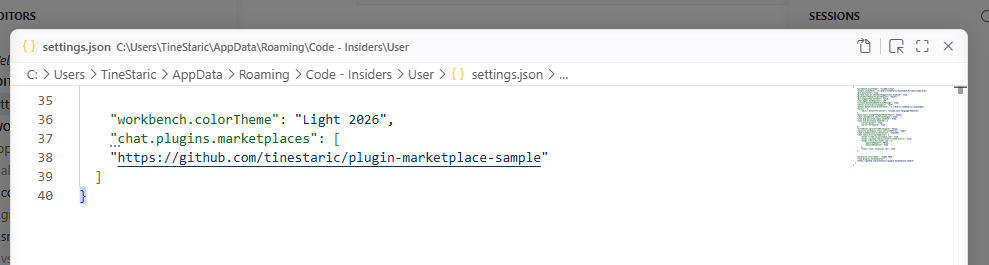
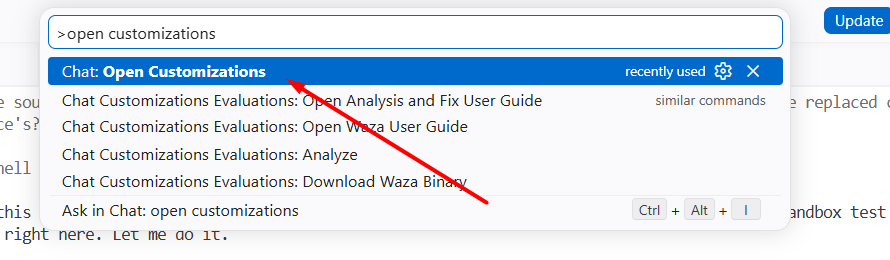
Then they open the Agent Customizations panel from the command palette:
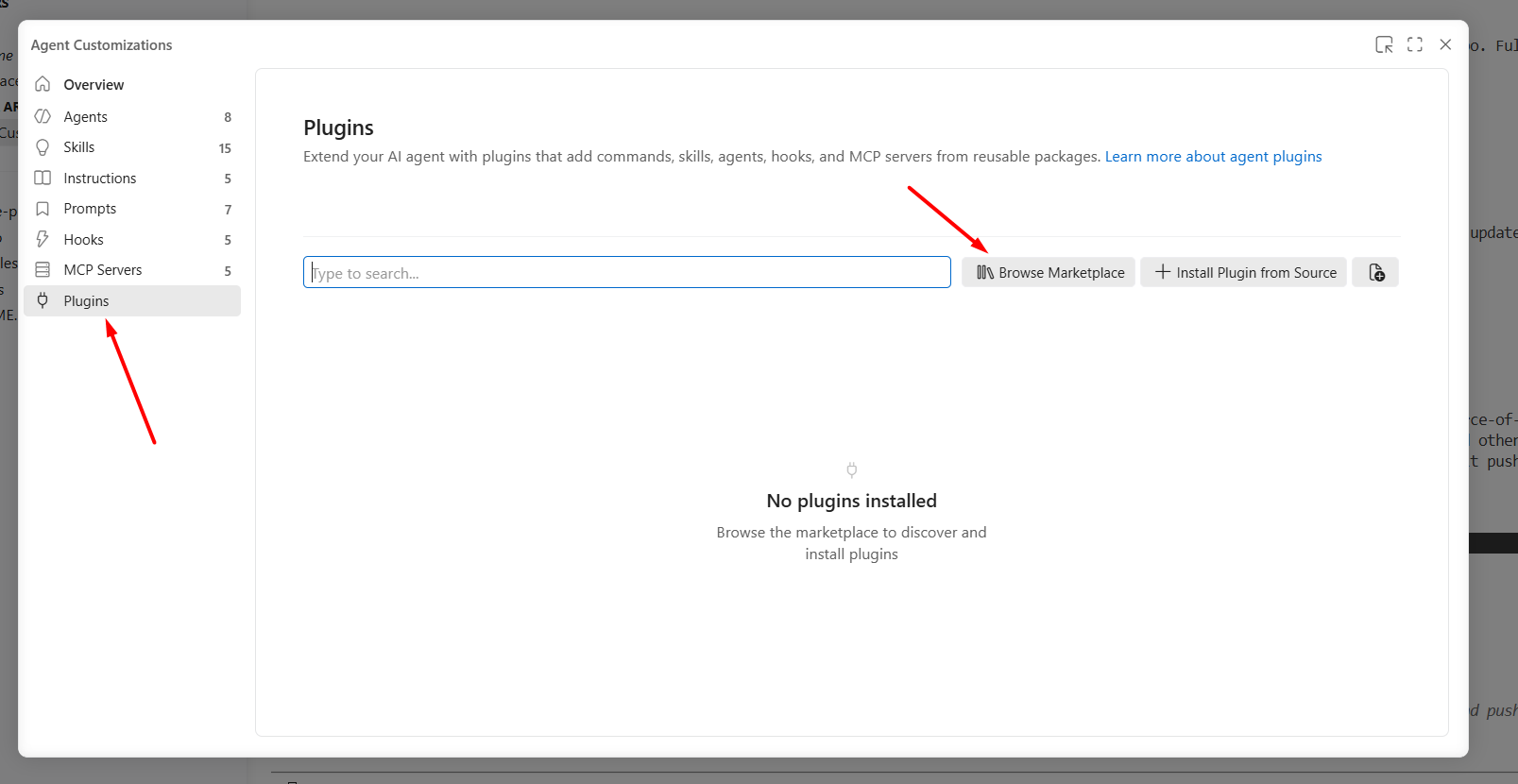
Go to Plugins, hit Browse Marketplace, and there’s the plugin, ready to install:
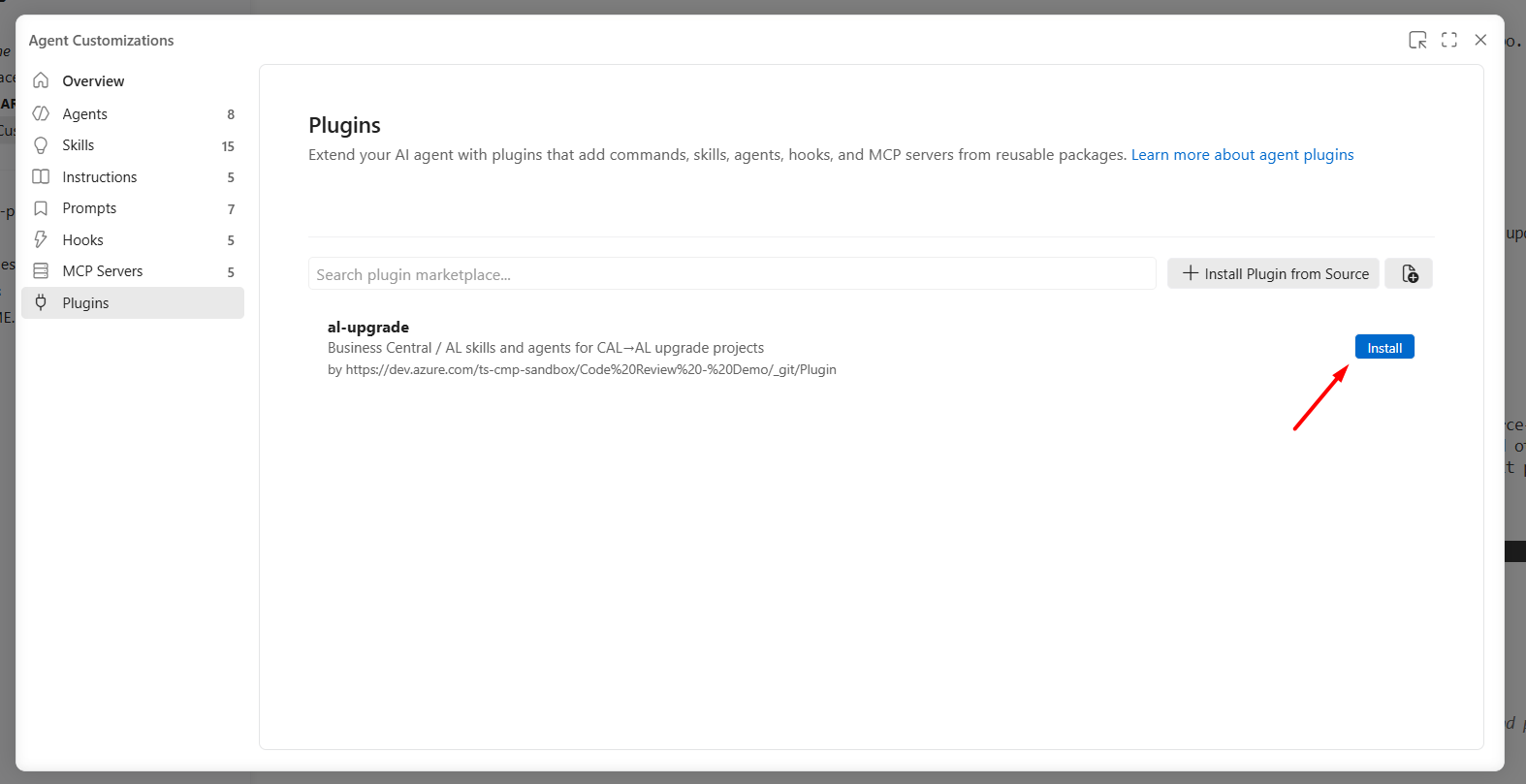
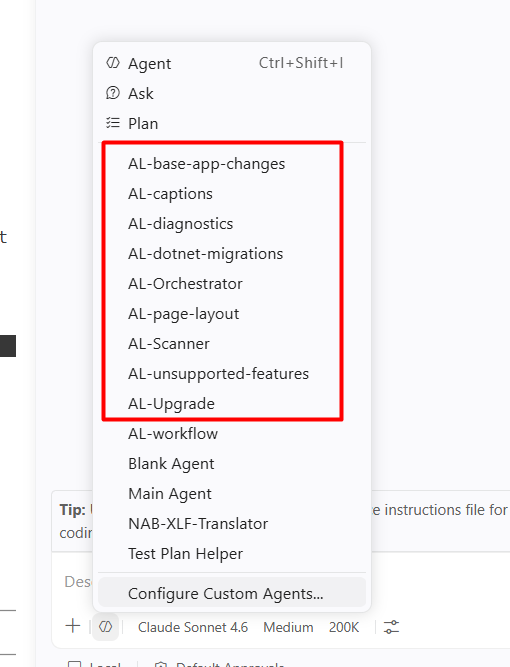
One click, and every agent in that plugin shows up in the agent picker, no config, no copy-pasting .md files into the right folder by hand:
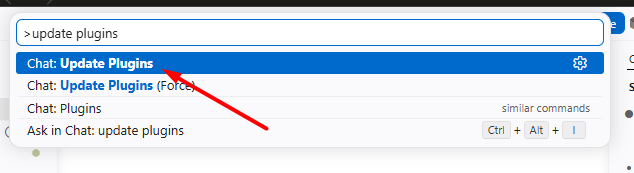
When I push changes to the repo, they don’t need to reinstall anything. One command syncs everything the plugin brings in, agents, skills, MCP config, all of it:
That’s it. That’s plug-and-play, and nobody had to build a custom extension to get there.
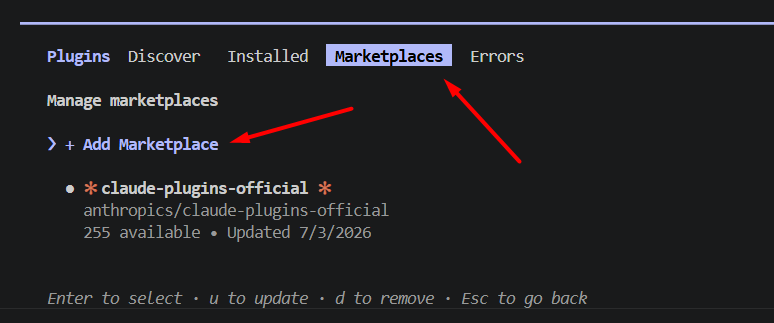
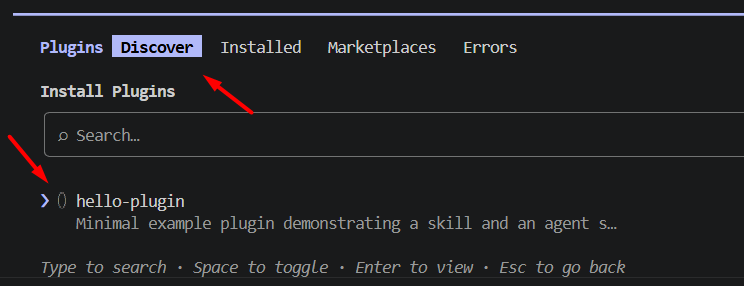
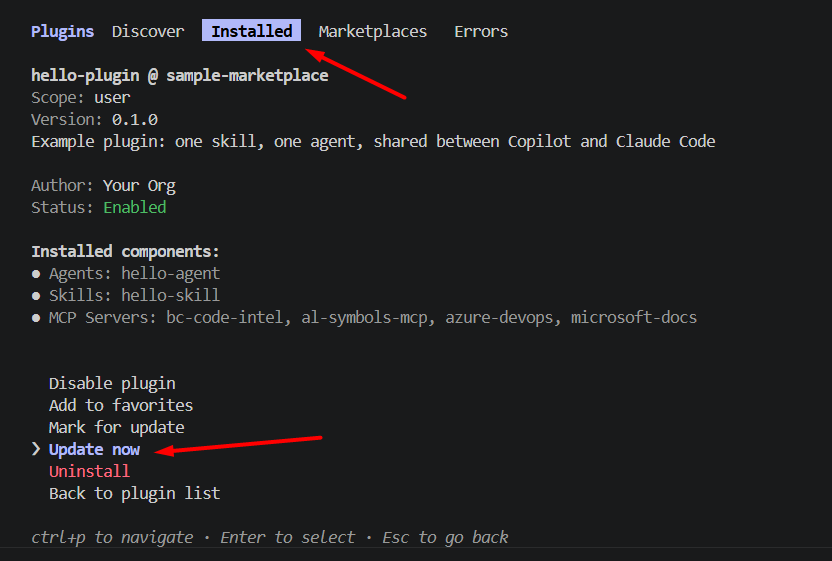
If you’re on Claude Code instead of VS Code, same idea, just a terminal UI instead of a panel. /plugin gets you the same tabs: Marketplaces to register the repo, Discover to find and install a plugin, Installed to see what you’ve got and check for updates:
What’s actually in the repository
I put together a stripped-down version of what I now use as a template, plugin-marketplace-sample, so you can see the whole thing at once instead of just screenshots. Two kinds of file make this work: marketplace manifests and plugin manifests.
At the repo root, you need a marketplace manifest per ecosystem, since each one looks in a different spot:
.github/plugin/marketplace.json      (GitHub Copilot)
.claude-plugin/marketplace.json      (Claude Code)
Both files say the same thing, just to a different audience. A name for the marketplace, an owner, and a list of the plugins it serves, each one pointing at the folder it lives in:
{
  "name": "sample-marketplace",
  "owner": { "name": "Your Org", "url": "https://github.com/your-org" },
  "plugins": [
    {
      "name": "hello-plugin",
      "source": "./plugins/hello-plugin",
      "description": "Minimal example plugin demonstrating a skill and an agent shared between Claude Code and GitHub Copilot"
    }
  ]
}
That’s the whole catalog. This is the file that turns a plain repo into something you can register as a marketplace in settings.json.
The actual plugin lives in the folder that source points to, and it carries its own manifest, again one per ecosystem:
plugins/hello-plugin/
  plugin.json                  (Copilot plugin manifest)
  .claude-plugin/
    plugin.json                (Claude Code plugin manifest)
  agents/                      (shared by both tools)
    hello-agent.agent.md
  skills/                      (shared by both tools)
    hello-skill/
      SKILL.md
  .mcp.json                    (MCP servers, shared)
One agents/ folder, one skills/ folder, nothing per-tool. Both plugin.json files stay this minimal, no path overrides, because agents/ and skills/ are already the default folder names both tools look for:
{
  "name": "hello-plugin",
  "description": "Example plugin: one skill, one agent, shared between Copilot and Claude Code",
  "version": "0.1.0",
  "author": { "name": "Your Org" }
}
That’s genuinely all there is to the packaging itself: name, description, version, author. From there it’s exactly what you’d expect: agent .md files with their usual frontmatter, skill folders with their SKILL.md, an .mcp.json if the plugin brings its own MCP servers. Nothing about authoring an individual agent or skill changes, you’re just putting them somewhere that can be distributed.
This works over a plain GitHub repo or an Azure DevOps repo, whichever your org already uses for source control. No new infrastructure.
Why there’s only one agents/ folder
GitHub Copilot and Claude Code name their built-in tools differently, Copilot’s edit is Claude’s Edit plus Write. My first instinct was to work around that the obvious way: one agent folder per tool, agents-copilot/ and agents-claude/, each with its own tool names in the frontmatter, each listed in its own plugin.json.
That broke the moment I actually tested it in VS Code. Copilot’s CLI only reads the first plugin.json it finds for a plugin, so the split worked fine there. But the Copilot extension inside VS Code reads every plugin.json it finds and merges them, so it picked up both folders at once and installed every agent twice.
The fix is simpler than the workaround, and you don’t have to give up restricting tools to get it. List both platforms’ tool names together in one tools array:
tools: [read, search, Read, Glob]
Each platform only recognizes its own names and ignores the rest, so Copilot resolves read/search and Claude Code resolves Read/Glob, from the exact same file. One agents/ folder, one file per agent, read as-is by both plugin.json manifests through their shared default.
One constraint worth knowing before you set this up yourself: skills/ needs a subfolder per skill (skills/hello-skill/SKILL.md, not a loose hello-skill.md), and inside that folder you can nest whatever you want, scripts, references, more subfolders, no problem. What you can’t do is nest the skill folders themselves any deeper, skills/hello-skill/ works, skills/category/hello-skill/ doesn’t. Ask me how I found that out.
Where this leaves things
Plugins don’t tell you what should be inside the box, that’s still on you and your team to figure out. But they remove the excuse for not shipping a default set at all. You’re no longer choosing between “build everyone their own extension” and “make people fend for themselves.” A plugin repo costs you a couple of manifest files and some discipline about where things live, and from there it’s one install command for anyone on your team, in whichever editor they already use.
Go build that one agent from vol.3. Then put it somewhere the rest of your team can actually reach. Clone the sample repo if you want a starting point.