The Copilot harness is now VS Code's default
One thing that annoyed me for a while: GitHub Copilot CLI, the VS Code Agents window and the GitHub Copilot app all shared the same Copilot runtime, but the one most of us use every day, Copilot Chat in VS Code, ran a VS Code-specific flavor of it. In my experience that made it harder to switch between tools, and some features landed elsewhere first.
With VS Code 1.142, that’s over. The Copilot harness is becoming the default for new agent sessions.
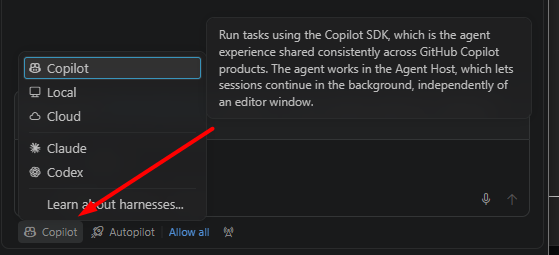
The tooltip on Copilot says it well: the agent experience shared consistently across GitHub Copilot products.
So what does that actually get you, and what do you have to do about it?
What changes
I won’t claim a huge day-one benefit. I haven’t found any benchmarks, and Microsoft doesn’t claim any either. What you get is structural:
- One behavior across VS Code, the CLI, the Agents window and the Copilot app, so features stop landing in one place first.
- Sessions run in the Agent Host, a separate process from the editor window. They can keep going in the background and be shared between the editor and the Agents window, so you can switch surfaces without copying a chat over.
- VS Code stops falling behind the other Copilot surfaces.
Local is still in the picker if you want the old behavior, and it still reads your old locations.
The homework
Some of your personal setup lives in places the new harness doesn’t read. The first time you open chat, you get this:
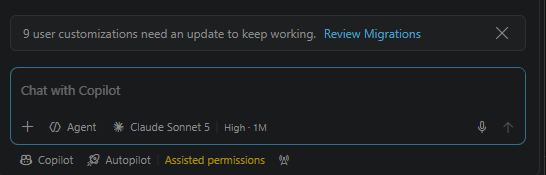
It doesn’t migrate anything silently, it takes you to a review list. You can also get there yourself through Chat: Open Customizations, then Migrations.
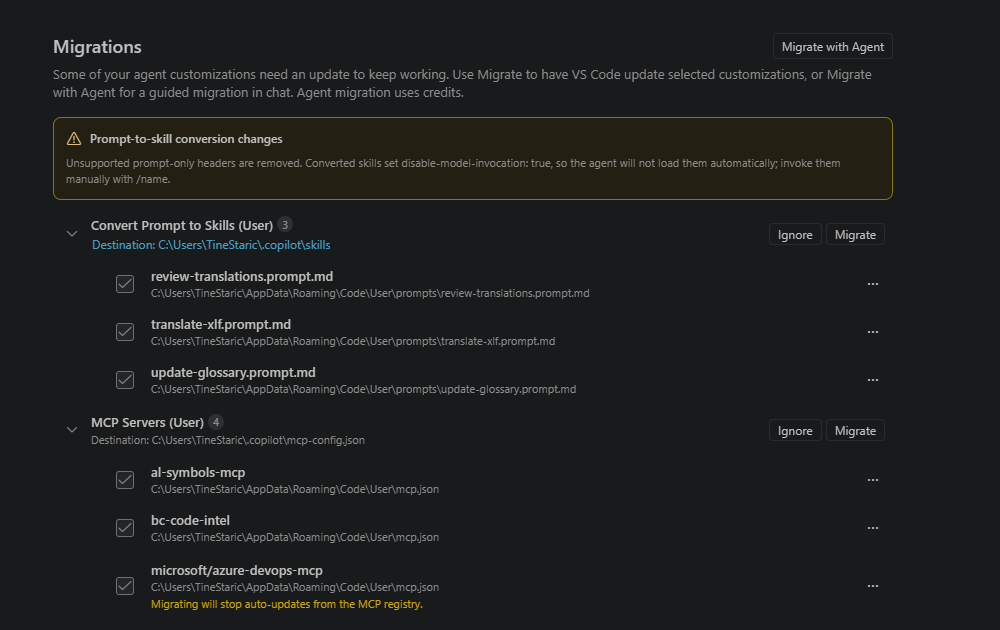
Each group has its own Migrate and Ignore. Migrate lets VS Code move the files itself. Migrate with Agent does it as a guided session in chat, which uses credits.
Nothing in the repo moves. Instructions, AGENTS.md and agents under .github stay where they are. What moves is your personal stuff, into ~/.copilot:
| What | Where it goes |
|---|---|
| Personal instructions | ~/.copilot/copilot-instructions.md and ~/.copilot/instructions/ |
| Personal agents | ~/.copilot/agents/ |
Prompt files (*.prompt.md) |
converted to skills, e.g. in ~/.copilot/skills |
| User MCP servers | ~/.copilot/mcp-config.json |
| Workspace MCP servers | .mcp.json in the repo |
Two things in my own list are worth knowing before you click anything.
Prompt files become skills, and lose some of their powers. The agent, model and tools headers get dropped, and the converted skills are set to disable-model-invocation: true. The agent won’t pick them up by itself anymore, you invoke them manually with /name. If you had a prompt file that was supposed to be triggered automatically, that part is gone.
Migrating MCP servers installed from the registry stops their auto-updates. The screen warns you about it in orange, right under the server. I migrated mine anyway, but now I’m the one who has to remember to update them.
How I’d do it
Commit first, migrate, then test in a fresh Copilot session before touching anything else. The migrated files are copies, not moves, so the originals stay where they were. Delete those last, once you know the new setup works, and don’t leave both active in the meantime.
Also keep in mind that this is a one-time move per machine. I haven’t checked whether Settings Sync carries ~/.copilot over, so don’t assume your personal setup follows you to the next laptop.
If you’ve already gone through the migration, I’m curious what broke for you. Mine was mostly prompt files and MCP servers, so I got off easy.